Remote for Fire TV & FireStick
BoostVisionEntertainment
4.06.65K Reviews
- Version
- 2.0.1
- Installs
- 10.00M
- Age Rating
- Everyone
Screenshots
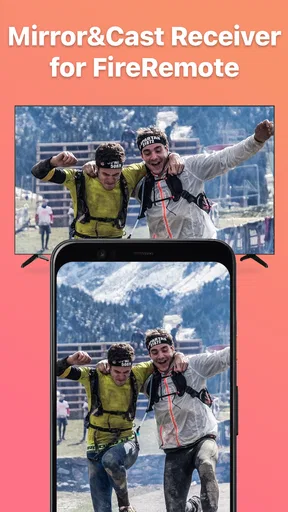
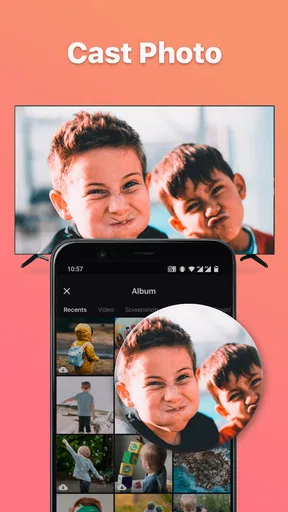
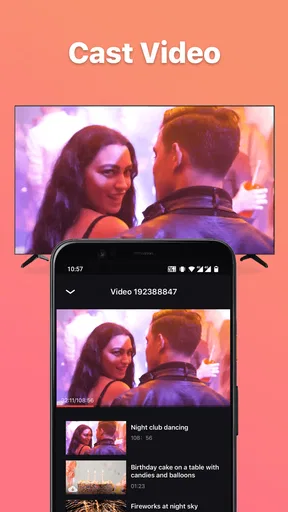
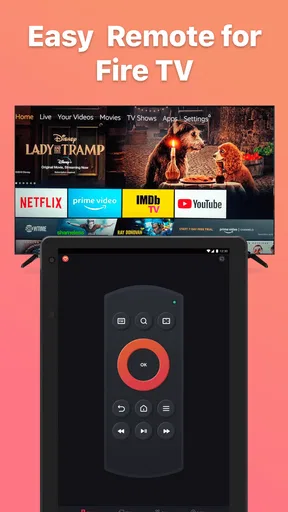
Our Review of Remote for Fire TV & FireStick
 Analysis by Appyee
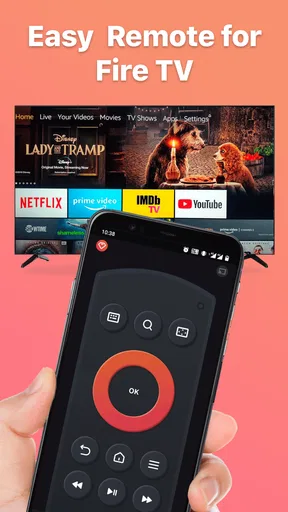
I tried Remote for Fire TV & FireStick as a practical entertainment app rather than treating it like a replacement for every remote in the house. Its purpose is straightforward: turn an Android or iOS phone into a controller for an Amazon Fire TV Stick, with screen mirroring included as part of the package. That sounds simple, but the usefulness depends heavily on how quickly the phone connects, how comfortable the controls feel, and whether mirroring fits your particular viewing habit.
My overall impression is that it is most valuable as a backup remote and a convenient second controller. When the physical remote is buried between sofa cushions, has a flat battery, or is being used by someone else, having a phone ready can save a surprising amount of frustration. I also found the mirroring option more interesting for occasional photos, short videos, or presentations than for replacing normal streaming on the television.
Remote for Fire TV & FireStick is free to install, belongs to the entertainment category, and comes from BoostVision. It has reached over ten million installs and holds a 4.0 average from around ninety-seven thousand ratings, which suggests a broadly useful product with some room for individual experiences to vary. The age rating is Everyone, so it is an uncomplicated option for households where several people may need access to the television.
How the current version fits into everyday TV use
I look at the current release through the small routines that decide whether a phone remote earns a place on the home screen: getting everyone connected, avoiding accidental control conflicts, and knowing when the physical remote is still simpler. The household angle matters just as much as the feature set, so I’ll consider how to keep shared use practical without assuming the app manages family accounts or permissions.
A phone remote that solves a very specific problem
The app is not trying to turn your phone into a full smart-home hub. Its central job is controlling a compatible Fire TV device, and that focus is a strength. I can open it when I need directional navigation, selection, playback control, or a faster way to interact with the television without searching for the original handset.
The first useful scenario is the familiar one: I sit down to watch something, reach for the remote, and discover that it is in another room. With this app already installed, my phone becomes the immediate fallback. That is especially handy when the television is mounted in a bedroom, guest room, or holiday accommodation where the remote is easy to misplace.
A second scenario is shared viewing. If another person is holding the physical controller, I can use the phone-based remote when I only need to pause, resume, or make a small navigation change. It is not a dramatic feature, but it reduces the small negotiations that often make casual TV use less convenient.
The third scenario is initial setup trouble. A phone remote can be useful when the physical controller is unavailable, although the exact connection experience still depends on the television device and the network arrangement. I would not treat it as a guaranteed rescue tool in every setup, but it gives users another route into their Fire TV environment instead of leaving them entirely dependent on one piece of hardware.
Connection is the part that determines the whole experience
With a remote app, the buttons are rarely the difficult part. The important question is whether the phone and Fire TV can see each other reliably. I recommend putting both devices on the same home network before judging the app. If the phone is using mobile data, a guest network, or a different wireless band that isolates devices, the connection may be less smooth than expected.
My practical advice is to open the app near the television during the first attempt, keep the Fire TV awake, and avoid switching networks while testing it. Once the connection is established, the experience feels much more natural. If discovery takes too long, I first check the network rather than repeatedly tapping the connection controls.
This is also where the app differs from a physical remote. A hardware controller is usually available as soon as it has power, while a phone remote depends on the phone being charged, unlocked, nearby, and connected correctly. That trade-off is easy to overlook when downloading it. The app is excellent redundancy, but I would not throw away the physical remote and rely on it as the only way to operate the television.
Navigation is convenient, but a phone is not automatically better
Using a touchscreen for directional movement is convenient because the phone is already in my hand. It also means I do not need to look for a separate object. On the other hand, touch controls do not provide the same physical feedback as a real button. When I am watching in a dark room, a physical remote is often quicker because I can operate it by feel.
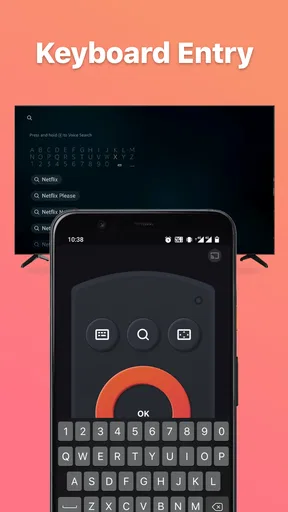
Typing is another area where a phone can be more comfortable than a small remote. Searching for a film, entering an account detail, or naming something with an on-screen keyboard can be tedious with directional buttons. A phone gives me a familiar touchscreen input method, although the exact typing workflow depends on how the Fire TV interface and the app communicate at that moment.
I also noticed that a phone introduces distractions. A notification, incoming call, or accidental swipe can interrupt the simple remote task. For short interactions this is not a serious issue, but it is one reason I still prefer the physical remote for long viewing sessions.
Screen mirroring has a different purpose from remote control
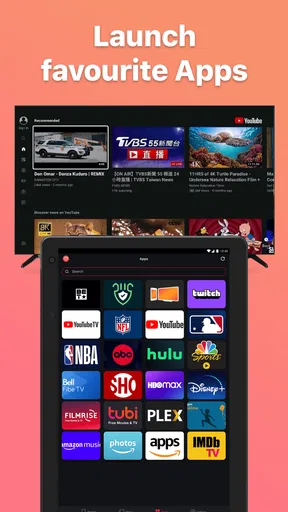
The mirroring function makes the app more than a basic controller, but I would keep expectations realistic. Mirroring is useful when I want to show phone photos to people in the room, display a short clip, or put a mobile presentation on a larger screen. It can also help when a piece of content is easier to access on the phone than through the Fire TV interface.
I would not automatically choose mirroring for a full evening of video. Phone notifications, orientation changes, connection quality, and the behavior of the source app can all affect the result. Some mobile services also handle casting and mirroring differently, so a dedicated in-app cast option may be better when one is available.
The strongest use of this feature is occasional sharing rather than permanent duplication of the phone display. Before starting, I close unrelated apps, enable the appropriate screen orientation, and make sure the phone will not be interrupted by private notifications. That small preparation makes mirroring feel much cleaner and avoids exposing messages or alerts on the television.
What has changed by the current release
The current version is 2.0.1, and the app was released on January 18, 2022. Those details place it in a product that has had time to establish its basic purpose rather than appearing as a brand-new experiment. I see the current release as an evolution of a focused remote-and-mirroring tool, not a completely different kind of entertainment app.
That distinction matters because I would not download it expecting a large collection of unrelated television features. The verified direction of the product remains clear: connect to Fire TV, provide remote control, and offer screen mirroring. Any future improvement I would want should strengthen those central tasks instead of adding clutter around them.
For existing users, the version number is useful when troubleshooting. If the app behaves differently after an update, I would first confirm that the phone and television are still on the same network, then close and reopen the app before assuming the device is unsupported. Keeping the app current can be sensible, but a version label alone does not guarantee that every connection problem will disappear.
Who gets the most value from it
I think this app is a good fit for people who regularly use a Fire TV Stick and want a dependable backup on their phone. It also suits households with children, guests, or multiple viewers because another person can access basic controls without taking the physical remote away from the main viewer.
It is a reasonable choice for travelers who use a familiar Fire TV setup away from home, provided they understand that hotel and guest networks can restrict device discovery. It may also appeal to someone who dislikes entering search terms with a conventional remote and prefers using a touchscreen when looking through television content.
The app is less suitable for anyone who wants a universal remote for every television brand and streaming box. Its identity is tied to Fire TV use, so buying it with the expectation that it will replace all household controllers would be a mistake. I would also skip it if I rarely use a Fire TV device, have no interest in mirroring, or dislike keeping a phone nearby during television time.
Small habits that make it work better
My first tip is to give the app a clear place on the phone’s home screen. A backup remote is only useful if I can reach it quickly, and burying it in an app folder defeats much of the convenience. I also keep the phone reasonably charged before a long viewing session because a remote app is not helpful when the phone is at its last few percent.
My second tip is to separate connection troubleshooting from control troubleshooting. If the app cannot find the Fire TV, I check the network and the television’s active state first. If it connects but a command feels delayed, I avoid repeatedly pressing the same control, since that can create a string of unwanted actions once the connection catches up.
My third tip concerns mirroring privacy. I use it for planned sharing, not as something to leave running casually. I silence or review notifications, rotate the phone before beginning, and stop the session as soon as the shared item is finished. This workflow is more reliable and avoids turning a family photo session into an accidental broadcast of personal messages.
A fourth trade-off is battery use. Remote commands themselves are light, but keeping a screen active for repeated navigation or mirroring can consume more power than using a physical remote. If I am watching for several hours, I prefer the phone remote for occasional commands and return to the hardware controller for continuous use.
Where the experience still has friction
The largest weakness is dependence on the local network. A remote app can feel perfect one day and awkward the next if the router changes, the phone moves to another network, or the Fire TV is not visible to other devices. This is not unique to BoostVision, but it affects the practical promise of instant control.
There is also a difference between free access and the complete ownership experience. The app is free, while in-app purchases range from $3.99 to $29.99 per item. I would examine the available options carefully before paying, especially if I only need emergency remote access. For occasional use, the free portion may be enough; for frequent use, the value depends on which conveniences are included and how often I use them.
The presence of purchases does not make the app unsuitable, but it means I would not describe every part of the experience as cost-free. My approach is simple: install it, test connection and core control in my own room, and decide whether the additional paid value matches my habits rather than paying immediately.
Another limitation is that a phone remote is not as physically focused as a dedicated controller. Calls, notifications, battery warnings, and ordinary phone multitasking remain in the way. Someone who wants a quiet, single-purpose object may find the original remote more comfortable even if the app is technically convenient.
How it compares with the usual alternatives
The most obvious alternative is the physical Fire TV remote. That option wins for tactile control, fast access, and independence from phone battery life. Remote for Fire TV & FireStick wins when the hardware remote is missing, shared, or inconvenient. I see the two as complementary rather than direct rivals.
Another alternative is the official control method associated with the Fire TV ecosystem. That may be preferable for users who want the most direct first-party route and do not need extra mirroring behavior. BoostVision’s app is more attractive to someone who specifically wants remote control combined with phone screen sharing in one entertainment tool.
There are also generic universal remote apps. They can make sense in a mixed-device home, but their broader compatibility may come with a less focused experience. This app’s narrower Fire TV purpose is a benefit if that is the device I actually use, and a disadvantage if I expect one application to manage televisions, streaming boxes, and other equipment equally well.
For showing photos or mobile content, native casting from the source app can be preferable to mirroring because it may leave the phone free for other tasks. Mirroring remains useful when the content does not offer a convenient cast route. The choice is therefore practical: use this app when the phone screen itself is what I need to share, and use a native casting option when I want the television to handle playback independently.
Questions I would settle before installing
Will it work without a Fire TV device? No useful reason exists to install it for a television that does not use the Fire TV platform. Its value comes from controlling that environment, so owners of unrelated smart-TV systems should look for a controller designed for their hardware.
Can it replace the physical remote completely? I would treat it as a strong backup and a convenient alternative, not a guaranteed permanent replacement. It relies on the phone, the application, and the network being ready. Keeping the original remote available is sensible.
Is screen mirroring suitable for every video service? I would not assume that. It is best for sharing the phone display, while a service’s own casting feature may provide a smoother viewing experience when available. Testing one important app before planning a whole movie night is the sensible approach.
Do I need to pay to try it? The app itself is free to install, and optional in-app purchases are listed between $3.99 and $29.99 per item. I would test the basic connection and control workflow first, then decide whether any paid option offers enough benefit for regular use.
Will it solve a bad Wi-Fi setup? No remote application can compensate for every network restriction. If devices cannot communicate locally, the first fix should be the network arrangement, not repeated tapping. That is particularly important on guest or hotel Wi-Fi.
What I would like to see next
For future development, I would prioritize connection clarity over extra decoration. A clear indication of whether the problem is the phone network, the Fire TV state, or device discovery would make the app easier for less technical users. Better guidance during the first connection would also reduce the temptation to blame the remote controls when the real issue is local networking.
I would also value a smoother distinction between ordinary remote use and mirroring. These are different activities with different expectations, so making the transition between them especially obvious would help prevent accidental sessions or confusion about what is currently being shown on the television.
Existing users should watch how version 2.0.1 behaves on their particular setup rather than assuming that a release number tells the whole story. The meaningful test is whether connection, navigation, and mirroring remain dependable in the room where the Fire TV is used. I would judge future updates by those practical results, not by promises of more features.
My recommendation after using it
Remote for Fire TV & FireStick earns a place on my phone because it addresses a real, recurring annoyance: losing access to the Fire TV remote at exactly the moment I want to watch something. The combination of phone control and screen mirroring gives it more range than a basic emergency controller, while its focused design keeps the purpose easy to understand.
Still, I would install it with sensible expectations. It depends on a compatible Fire TV setup and a network that allows the devices to communicate. The phone battery, notifications, and touchscreen feel also make it less relaxing than a physical remote for long sessions. Optional purchases mean I would test the free experience before spending anything.
My honest recommendation is to use it as a capable companion rather than a total replacement. It is especially worthwhile for Fire TV households that want a backup, easier phone-based searching, or occasional screen sharing. If I needed a universal controller for several brands, or if my main priority were uninterrupted movie watching with no phone involved, I would choose a different solution. For the right Fire TV owner, though, BoostVision’s app is a practical tool that can quietly become useful whenever the original remote is not within reach.
Verdict
Strengths of Remote for Fire TV & FireStick
- Works with most Fire TV and FireStick generations.
- Offers convenient text entry from your phone’s keyboard.
- Makes app navigation easier than using the physical remote.
- Useful as a backup when the original remote is misplaced.
- Simple interface with quick access to playback controls.
Limitations of Remote for Fire TV & FireStick
- Requires both devices to use the same Wi‑Fi network.
- Some features may require in-app purchases or subscriptions.
- Connection can drop when the network signal is weak.
- Typing and navigation may feel delayed on older Fire TV models.
- The app cannot control Fire TV devices that are completely offline.
Other Releases by BoostVision
View All
Universal TV Remote for All TV
Tools4.4

TV Remote control for All TV
Tools4.2

Remote for Smart Samsung TV
House & Home4.2

AirMirror: TV Cast & Mirror
Video Players & Editors4.3
Similar Picks in This Category
View All
Google Play Games
Google LLC3.9

Netflix
Netflix, Inc.4.8

YouTube Kids
Google LLC4.2

Disney+
Disney4.4

Prime Video
Amazon Mobile LLC4.7

Steam
Valve Corporation3.2
Frequently Asked Questions
What is Remote for Fire TV & FireStick, and how does it work?
Remote for Fire TV & FireStick is a mobile remote-control app designed to operate compatible Amazon Fire TV devices from an Android phone or iPhone. After installing it, your phone generally needs to be connected to the same Wi-Fi network as the Fire TV. The app then searches for available devices, allowing you to select and control one using on-screen navigation buttons, playback controls, and keyboard input.
Is Remote for Fire TV & FireStick compatible with every Fire TV device?
Compatibility can vary depending on the Fire TV model, operating system, phone, and the specific version of the application. It is intended for Fire TV and FireStick products that support network-based remote control, but older devices or unusual network configurations may not be detected. Before downloading, check the app listing and confirm that your Fire TV model and mobile operating system meet the stated requirements.
Does my phone need to be connected to the same Wi-Fi network as FireStick?
In most cases, yes. Your phone and Fire TV or FireStick normally must be connected to the same local Wi-Fi network so the app can discover and communicate with the streaming device. If the FireStick does not appear, check that both devices use the same network name, disable mobile data temporarily, and make sure guest-network isolation or router settings are not blocking communication.
Can I use the app if I have lost or cannot use my original Fire TV remote?
Yes, the app can be useful as a replacement when the original remote is missing, damaged, or has depleted batteries, provided the Fire TV is already connected to a reachable Wi-Fi network. Initial setup may be more difficult if the device is offline or connected to a different network. In that situation, you may need the original remote, another compatible controller, or a temporary network workaround.
Are there advertisements, in-app purchases, or privacy considerations?
The exact advertising, subscription, and purchase options can differ between versions and between Android and iOS. Review the current store listing before installing, especially if you want an ad-free experience or access to additional controls. Because the app communicates over your network and may request device-related permissions, read its privacy disclosure and only grant access that appears necessary for remote-control functionality.
